Visualizing Quadra’s Logic

Source: AETI / Adobe Stock
With major version 12.0, we are pleased to announce the new Charge Inspector, Asset Change Inspector, and Invoice Inspector, which were developed to provide clients with more clarity on how amounts are calculated.
With the Inspectors, Quadra® provides valuable insight into calculation details to support clients, their stakeholders, and their auditing teams. The Inspectors include:
- The Charge Inspector, a record of the allocation calculation process, including initial charges, shared amounts, cap and collar adjustments, modifiers, payors, and overrides.
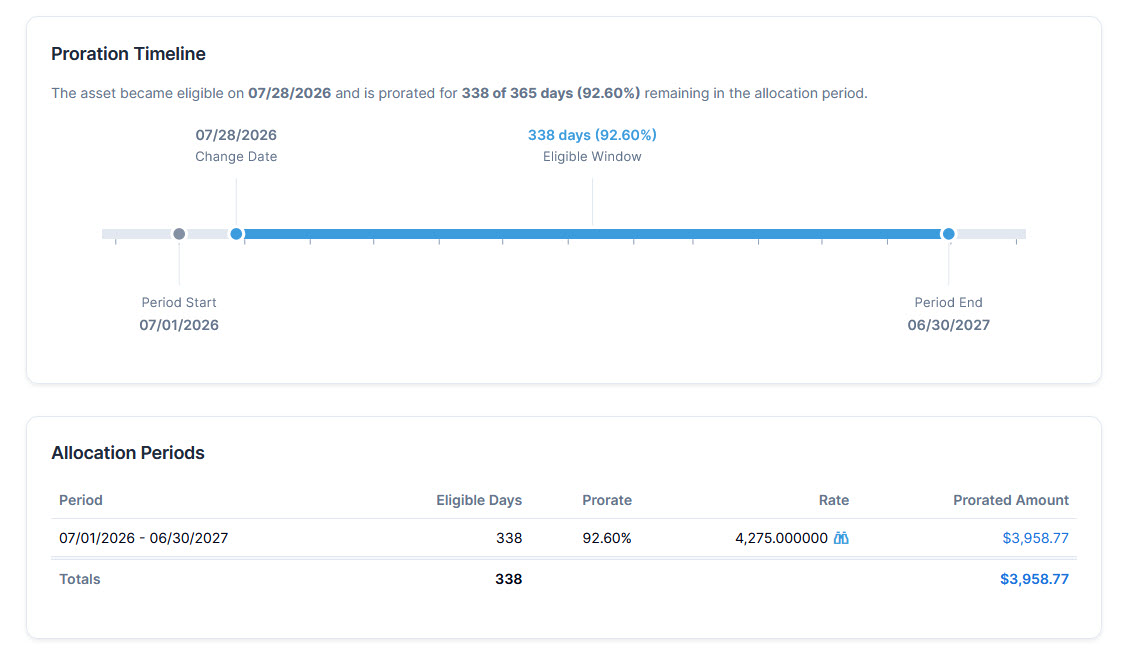
- The Asset Change Inspector, a record showing how an individual asset change arrives at its final amount, including proration and rate details.
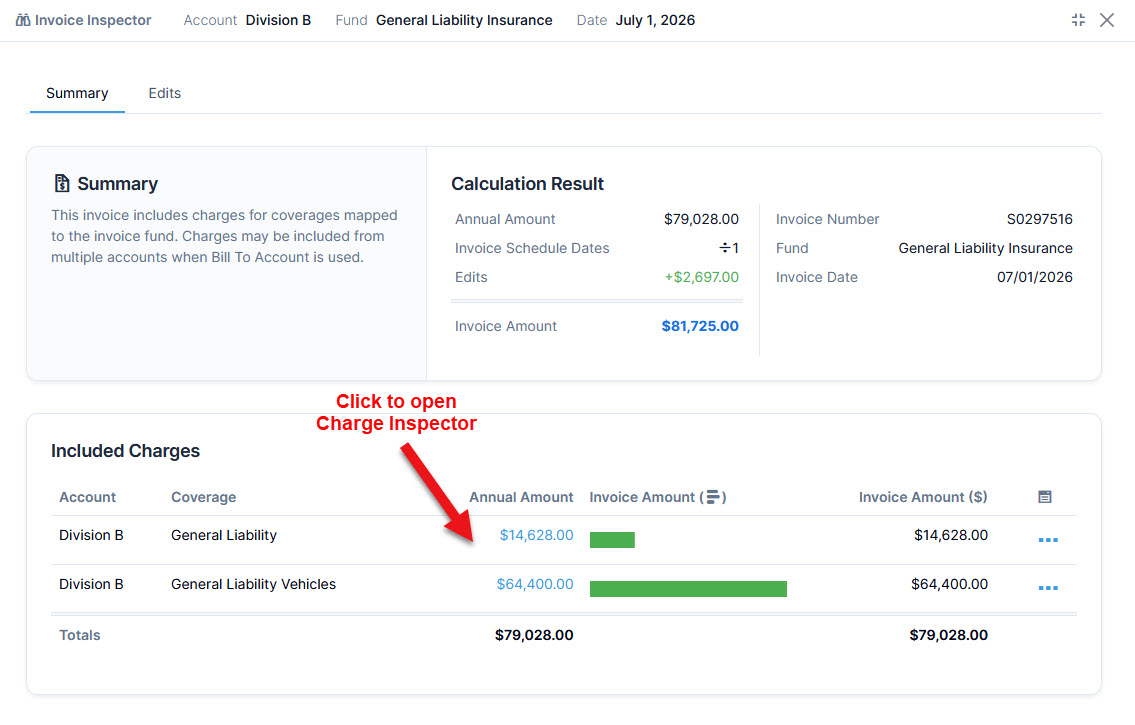
- The Invoice Inspector, a record showing which account and coverage charges make up an invoice and how those charges contribute to the final invoice amount.
We have several other updates to announce such as various interface changes and enhanced features.
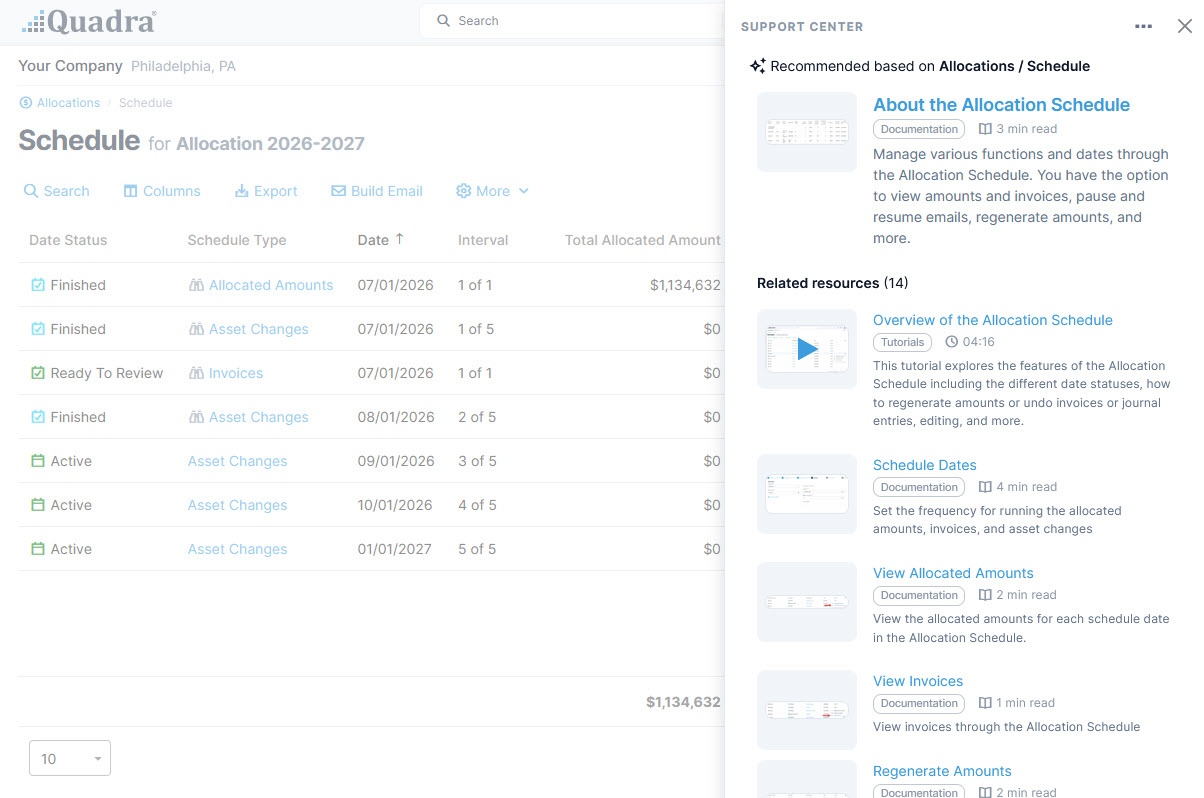
Plus, the new Support Center brings helpful resources directly into the area where you’re working, highlighting documentation relevant to your current task along with related tutorials, news, and other resources.
The Charge Inspector
Quadra's Charge Inspector is a record of the allocation process for an account and coverage. It illustrates how an initial charge is calculated and then subsequently altered according to various settings. The allocation process follows a hierarchy of equations. Each step is explained in the Charge Inspector.
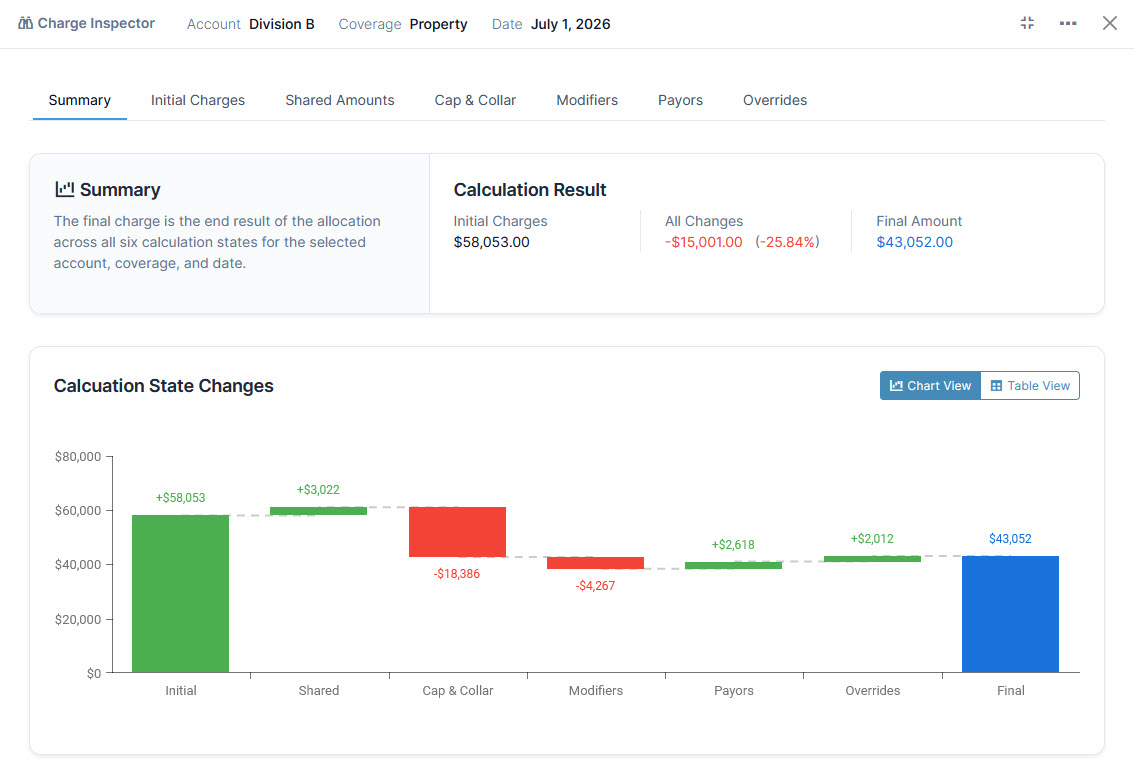
The Summary, the first tab of the Charge Inspector, displays the initial and final charges for an account and coverage and how the initial amount changes according to user-specified rules. These rules, which are established when setting up a new allocation, specify details for cost-sharing, charge limits, overrides and other factors that ultimately determine the final charge.
The Charge Inspector Summary provides an overview of all iterations of a charge by account and coverage:
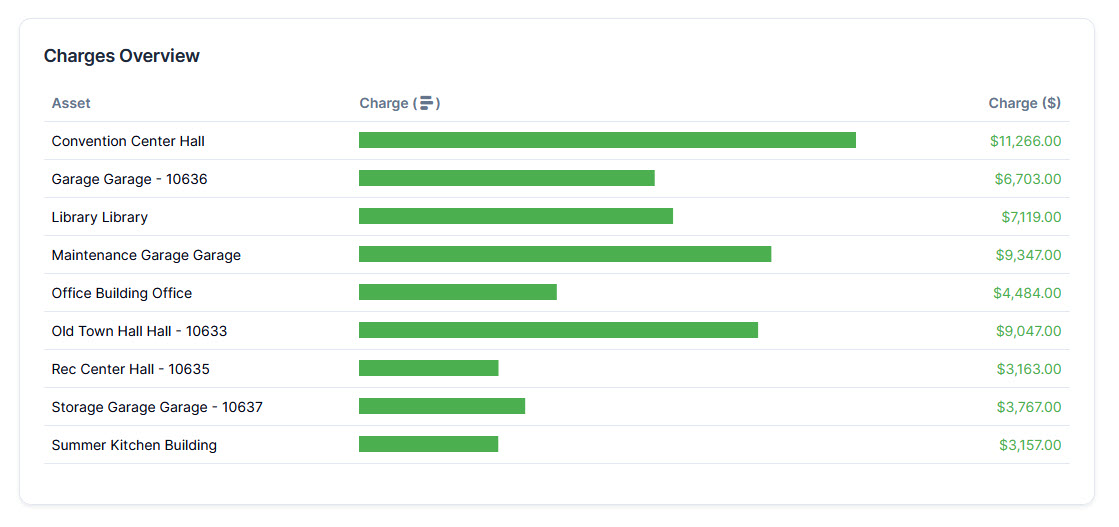
The Initial Charges tab illustrates the source of the rate that is applied to the basis which results in a preliminary amount. The Charges Overview summarizes the assets and their charges contributing to the initial value:
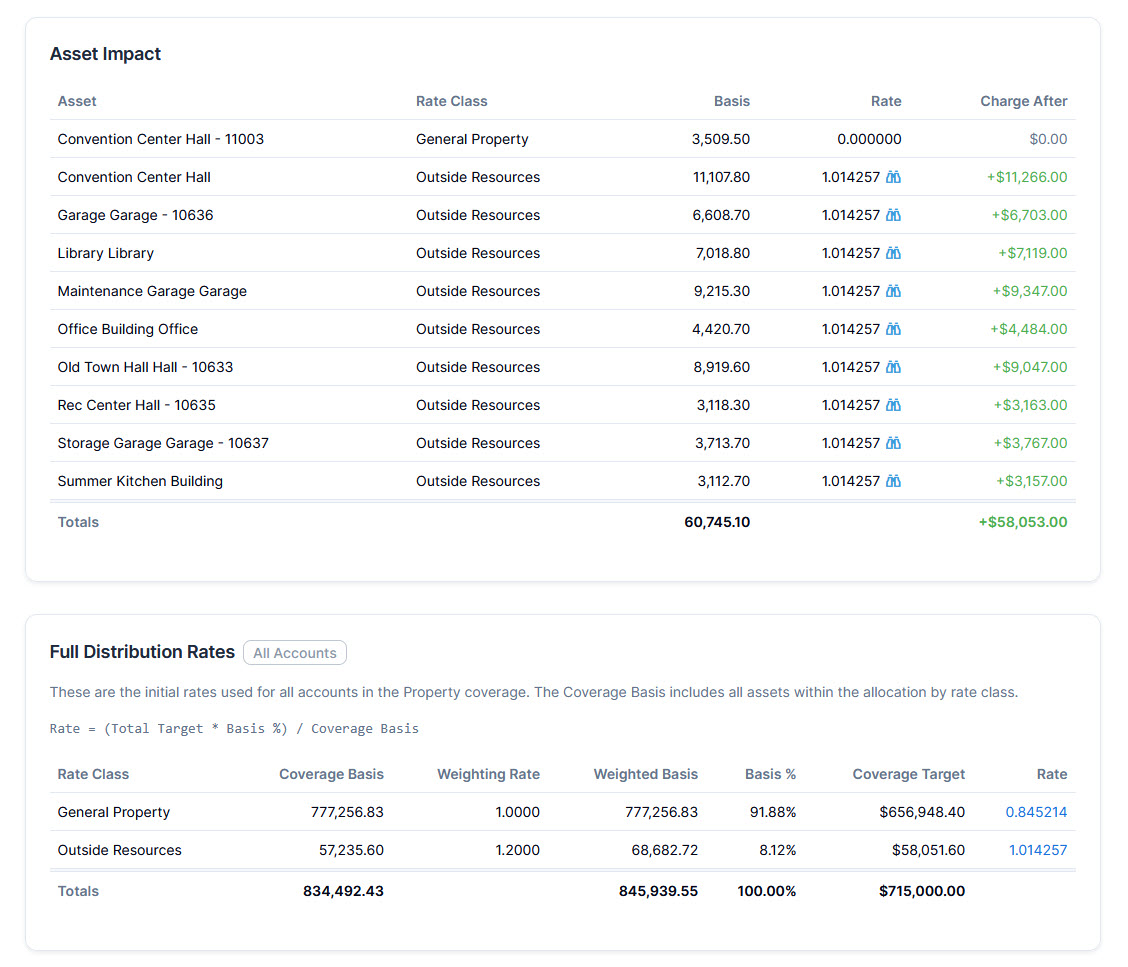
On the Initial Charges tab, the Asset Impact section specifies assets, their rate classes, basis, calculated rates, and initial charges. The Full Distribution / Fixed Rates section illustrates the source of the rates for each rate class. The rates are calculated from the entirety of all accounts within one coverage:
The subsequent tabs in the Charge Inspector, which are Shared Amounts, Cap & Collar, Modifiers, Payors, and Overrides, provide details for each calculation state. Calculation states involve changes to the initial charge as it is subjected to each set of user-defined rules.
The Asset Change Inspector
The Asset Change Inspector is a record of the activities that triggered asset changes. Each of the tabs outline the impact of adding or dropping assets, using modifiers, changing payors, or performing edits. The record illustrates the changing amount for a specific asset.
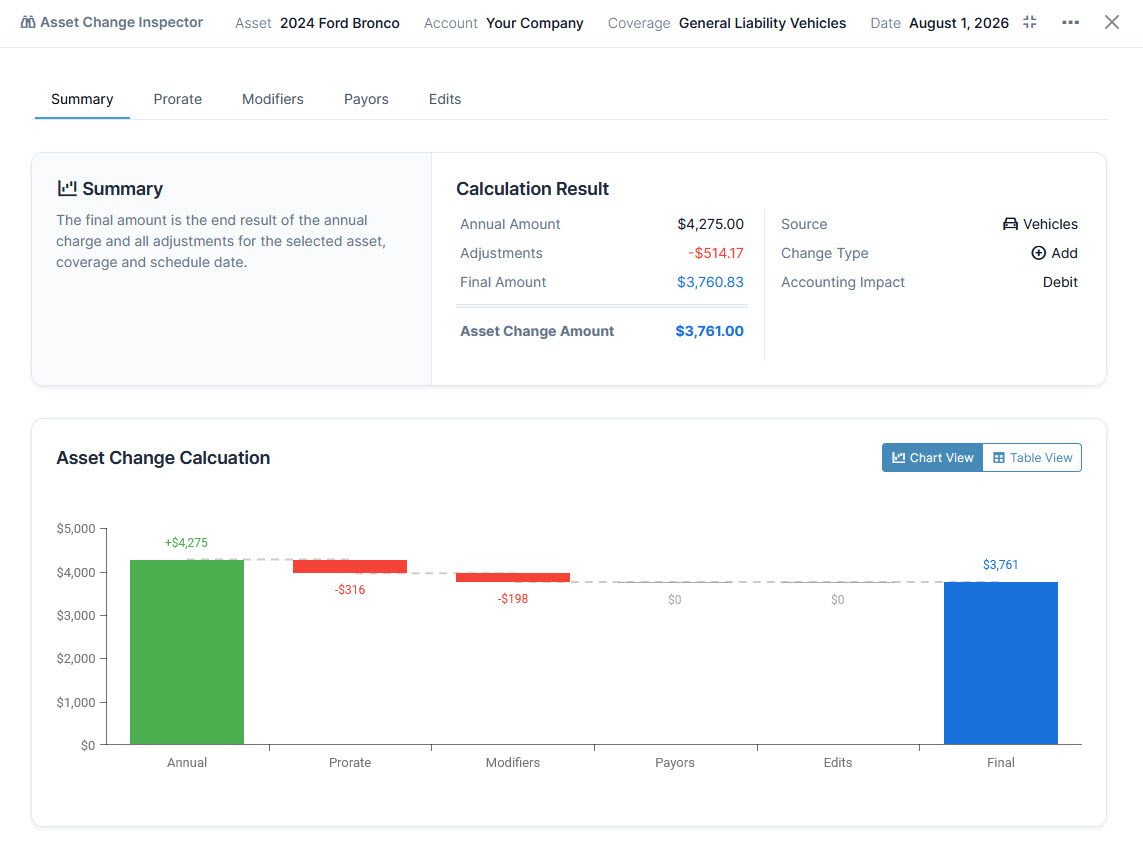
The final amount is the result of the annual charge and all adjustments for the selected asset, coverage and schedule date.
The Summary tab of the Asset Change Inspector provides an overview of the initial and final allocation amounts resulting from asset changes for a specific asset. The Asset Change Calculation illustrates the impact of proration, modifiers, payors, and edits on the final amount:
The Prorate tab provides a visualization of how the prorated amount is calculated:
The Invoice Inspector
The Invoice Inspector is a record of the factors that produce final invoice charges. Each invoice includes charges for a specific coverage. It provides details on how the amount was calculated, the coverage and its associated fund, and accounts. The second tab, Edits, includes details on the edits made to the charge, when they were made, and who made them. Charges may be included from multiple accounts when Bill To Account is used.
The Summary for the Invoice Inspector shows the Calculation Result, which includes invoice details, the annual amount, the number of periods serving as a divisor, and edits that result in the final amount. The Included Charges lists the assets that comprise the invoice.
From the Summary tab of the Invoice Inspector, access the Charge Inspector for the Annual Amount by either clicking on the amount for a row or selecting the option from the action menu:
Access Inspector Data
The Charge Inspector is available from the Preview tab of the allocation wizard. The full suite of inspectors are available from the Allocation Schedule.
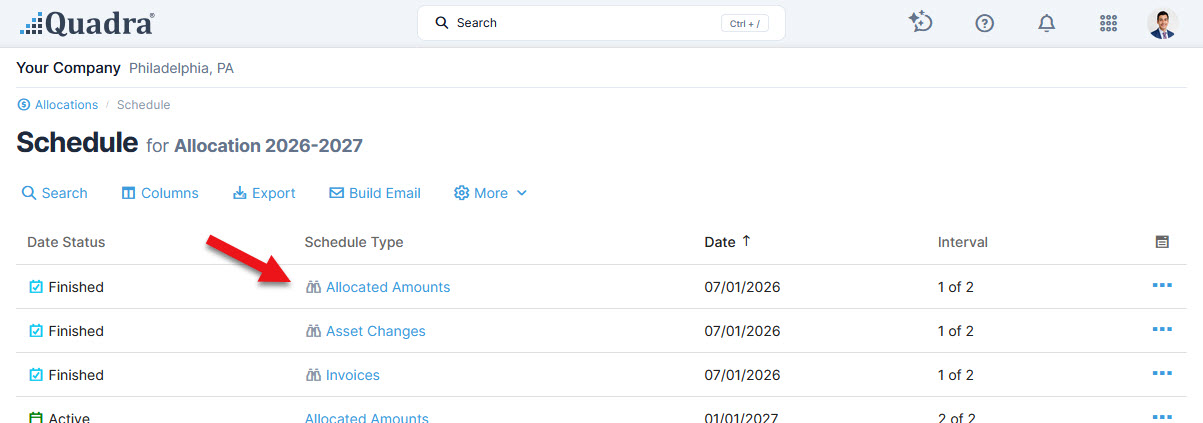
From the Allocation Schedule, the binoculars icon next to the Schedule Type indicates if Inspector data is available. Click the Schedule Type to open the grid of amounts for that date:
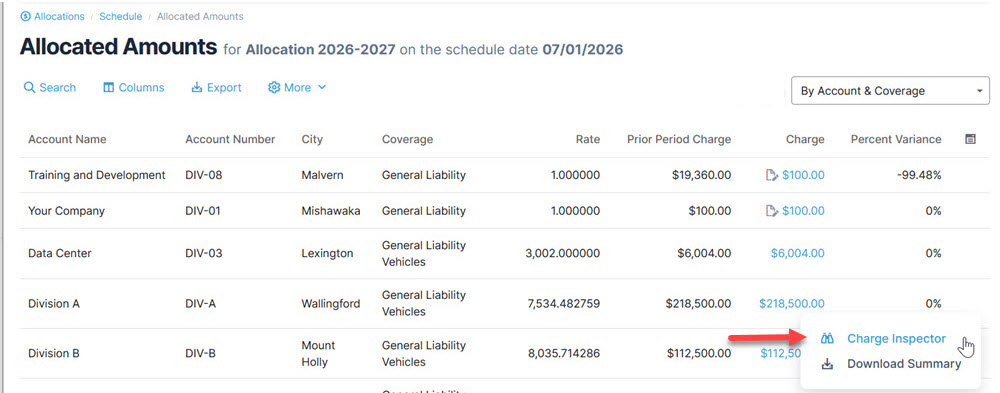
From the Amounts table, open the Inspector by either clicking on an amount or making the selection from the action menu:
Please note that schedule dates processed after the v12.0 release will have Inspector data available. The Allocations wizard Preview will always have Inspector data available.
Past dates, run prior to v12.0, will have Inspector data available only if they are regenerated. Inspector data is not back-filled for all dates to avoid discrepancies caused by edits made after the date was generated.
View more details on the Inspectors, the different tabs, and what they illustrate.
Capture and clarify
The Inspectors take Quadra’s allocation, asset change, and invoicing processes out of the black box for clients and provide quantitative details for a greater understanding of each amount. This clarity forges trust across departments as team members can view the logic behind the final charges.
The Inspector experience makes complex allocation results easier to understand by showing not just the final amount, but how that amount was calculated. Together, the Inspectors illustrate the annual allocation to asset change to invoice, providing transparency for financial teams and auditors.
Introducing the new Support Center
Quadra's AI assistant, released last year to improve support and navigation of help topics, now returns additional information including links to tutorials in response to related inquiries. Read more about the new Support Center.
To view the entire list of changes with v12.0, please refer to Quadra's version history.
We thank you for your continued partnership with AETI and hope your fall season is off to a great start!