Charge Inspector - Summary
The Summary, the first tab of the Charge Inspector, provides an overview of the initial and final charges for an account and coverage.
The summary shows how the initial amount alters according to user-specified rules regarding cost-sharing, caps, collars, payor preferences, and other factors that determine the final charge.
Click the X in the upper right corner to close the Charge Inspector and return to the allocation Preview.
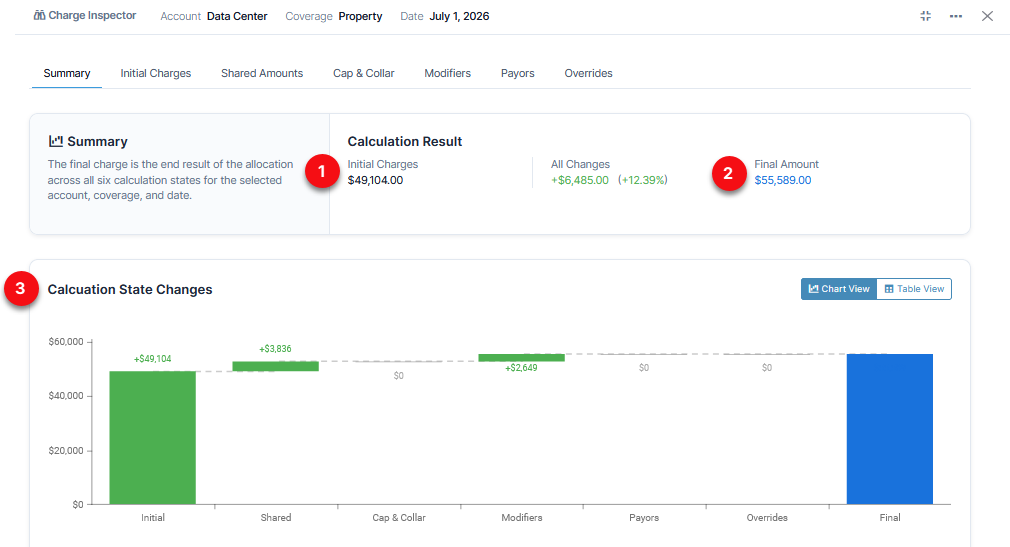
1. The Initial Charge results from the first set of calculations. This is the amount before subsequent allocation variables are factored in. Charges are created by the total assets multiplied by the rate.
2. The Final Charge is the end result of the allocation across all six calculation states for the selected account, coverage, and period. This value appears in the Preview tab in an allocation.
3. The Calculation State Changes chart shows how the charge is adjusted at each step of the allocation equation. Click on any section of the chart to view details for that particular state.
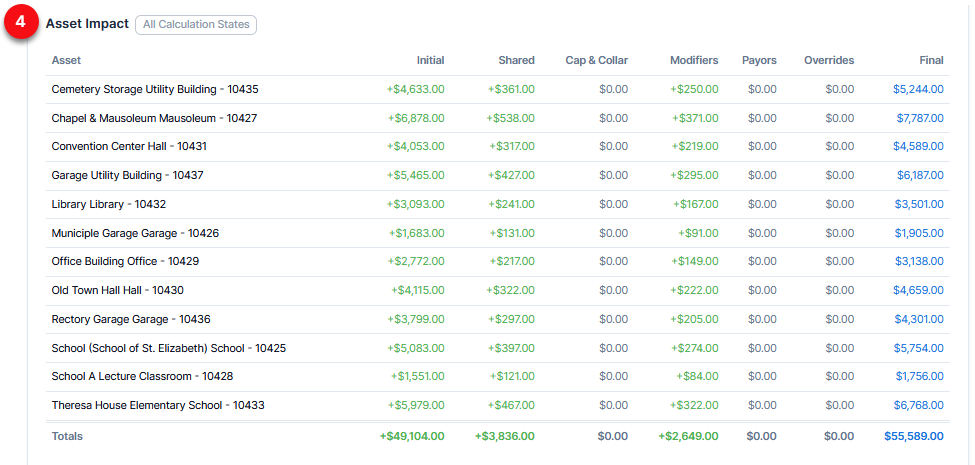
4. The Asset Impact table on the summary shows the transition of the charges resulting from all six calculation states.
Subsequent tabs in the Charge Inspector each have an Asset Impact section which shows how the amount is determined due to that particular calculation step.
Charge Inspector tabs: