About the Inspectors
For details on the factors that resulted in allocated amounts, invoice amounts, and asset change amounts, use the Inspectors within Quadra.
These records illustrate how amounts are calculated and the various client-specified rules that impact the final results.
Read more about:
The Charge Inspector, a record of the allocation calculation process, including initial charges, shared amounts, cap and collar adjustments, modifiers, payors, and overrides.
The Asset Change Inspector, a record showing how an individual asset change arrives at its final amount, including proration and rate details.
The Invoice Inspector, a record showing which account and coverage charges make up an invoice and how those charges contribute to the final invoice amount.
Access the Inspectors from the Allocation Schedule
On the Allocation Schedule, the binocular icon next to allocated amounts, asset changes, or invoices indicate that there is an Inspector available. Clicking on the Schedule Type will open the list of dates.
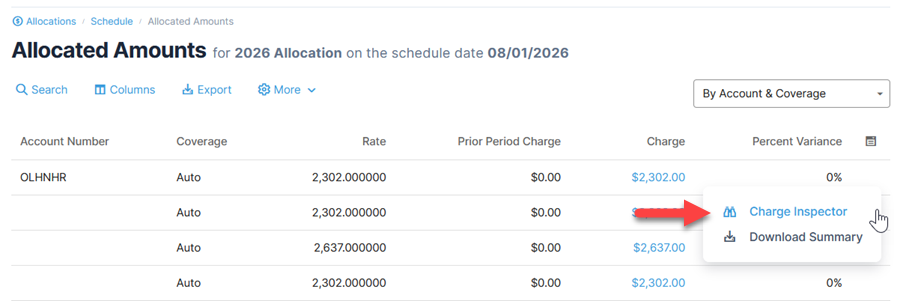
From the scheduled dates page, select a date and then click the option under the action menu.
Alternatively, click on the amount.
Note that for the Allocated Amounts, you must select By Account & Coverage as the view to access the Inspector.

Not finding the Inspector data you need?
Note that any Allocated Amounts or Asset Changes schedule date run after v12.0 will have Inspector data available. The allocation wizard Preview will always have Inspector data available.
Past dates, run prior to v12.0, will have Inspector data available only if they are regenerated. Inspector data is not back-filled for all dates to avoid discrepancies caused by edits made after the date was generated.