Table of Contents
About the Asset Change Inspector
The Asset Change Inspector is a record of the activities that triggered asset changes, which include adding or dropping assets, using modifiers, changing payors, or performing edits. It illustrates the changing amount for a specific asset.
The final amount is the end result of the annual charge and all adjustments for the selected asset, coverage and schedule date.
Access the Asset Change Inspector
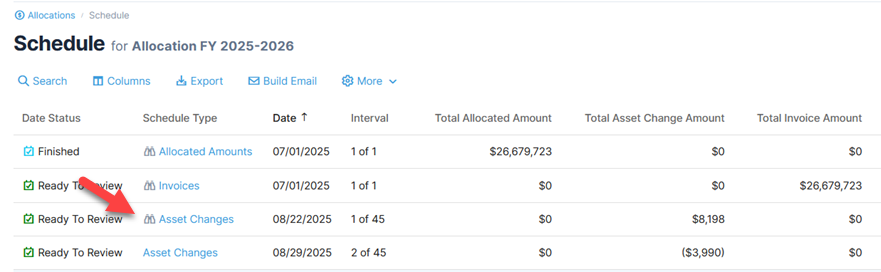
- Open the Allocation Schedule.
- Select an asset change schedule date with the icon, which indicates an Inspector is available. Click the Schedule Type to view asset changes.
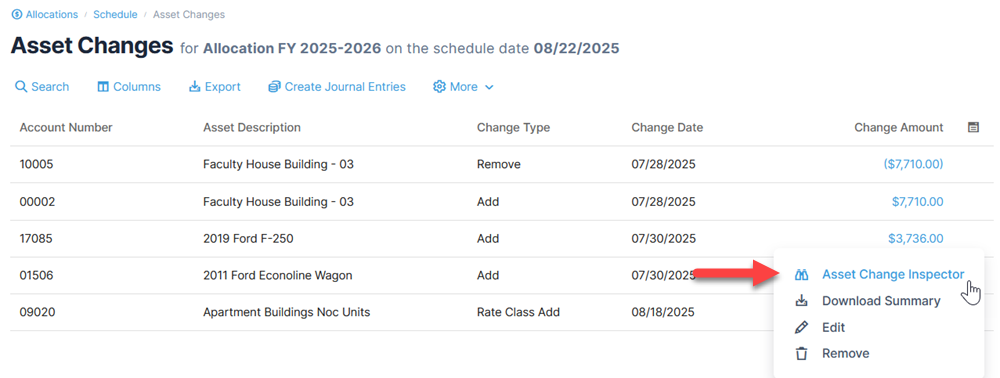
- From the Asset Changes page, select an asset change and click Asset Change Inspector from the action menu.
Alternatively, click the amount to open the Inspector.