Transformative Developments

Source: Adobe Stock
With the year ending soon, we are proud to showcase our progress in supporting our clients in the alternative risk sector. As we iterate our solutions to ensure our clients can protect their assets, secure their viability, and build a risk-aware culture, we are also working to anticipate future needs as our industry evolves. Our solution Quadra® has undergone significant changes in the past year with several updates worth noting.
This year, we launched two major versions: Quadra 10 which featured a whole new interface and core structure and Quadra 11 which included expanded AI-powered capabilities for analysis, writing support, and help navigation.

Quadra 10: Revised interface and functions
Quadra 10 was introduced in early 2025 and uses a cutting-edge web technology stack. It is a significant upgrade affecting all functions and modules and features a new interface, improved functions, and faster processing. More specific features include a quick search tool, additional preferences, changes in viewing account details, Your Account updates, added history by note and history by document, and revised controls in Administration.
In Quadra 10, the Allocations wizard was streamlined and two-factor authentication was updated for enhanced security. The aim of this release is to provide clients with better user experience with even more power in managing complex insurance programs

Quadra 11: Intelligent capabilities
Quadra 11 was the second major release this year and included expanded intelligent capabilities through the AI assistant, which was first introduced on the AETI site to supplement the Quadra help documentation. With this update, the assistant is now available from the interface and can perform analysis of documents, reports, and survey responses in addition to providing answers about Quadra. Writing support is also available from all html-editing windows within Quadra, including those in Notes and Email Builder. This tool can expedite composition, improve text, and easily implement style changes.
Since the assistant is built on a large language model, inquiries can be made using a casual style, the same way you would talk to a person. Through the chat window, users can refine their requests during the conversation to better direct the assistant’s search function. The document upload feature in the assistant allows users to analyze contents, compile survey results of open-ended questions, create outlines and more.
As part Quadra 11, other features included a new grid mode available in the Allocations module and users can view imported rates as a searchable grid; a payor history feature in the Vehicles, Structures, and Other Exposures modules; a new ‘Favorites’ column for reports; an alternative method for accessing notifications from the icon at the top of the interface and; and the ability to set a remove date for notes in the Notes module.
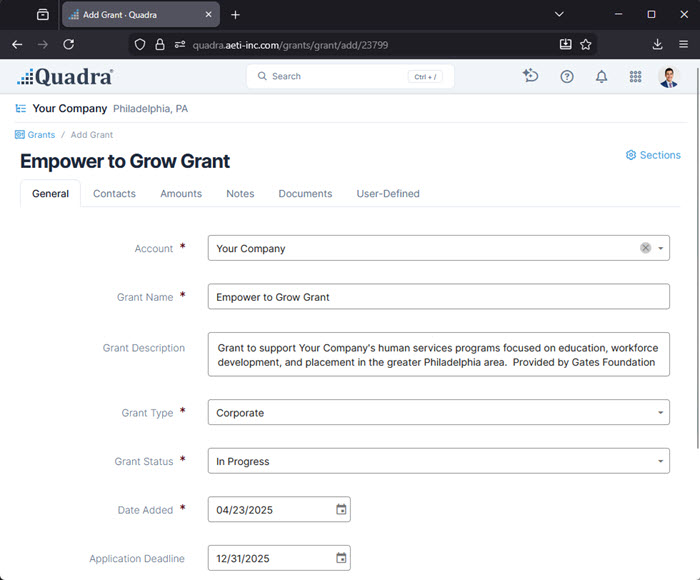
Grants module
Another significant addition this year is the Grants module which was created to further support our nonprofit users. Clients had requested a streamlined system to help manage grant applications along with tasks, contacts, and deadlines, so this new module was introduced with version 10.2. General information is stored in different sections while the ‘Notes’ section is divided into steps that follow stages of the funding cycle such as ‘Pre-Award’, ‘Award’, and ‘Closeout’. This section allows users to create notes, assign tasks to team members, and set deadlines.
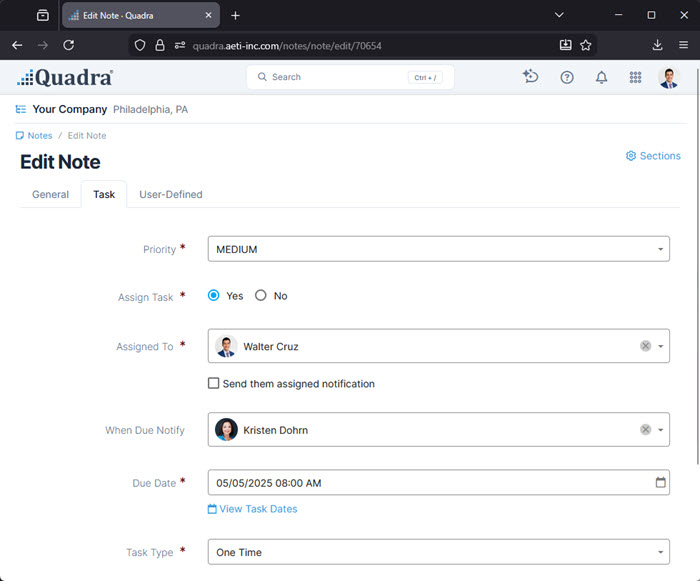
Revised Notes module with task management
The Notes module was also revised to support the new Grants module capabilities. The Notes module now has features for assigning tasks to multiple users, a recurring task option, and additional email notifications. These updates to Notes provide even more options for scheduling to-do items that will benefit all users.
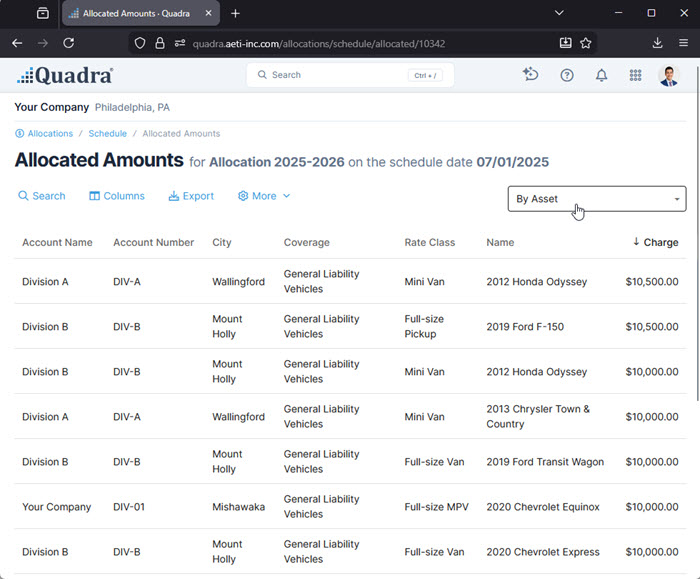
Allocations module improvements
Several enhancements launched this year bring more functionality to the allocation process. A new grid mode available in the Allocations module presents allocated amounts with greater flexibility and the ability to view imported rates as a searchable grid has been added.
Users can now specify the type of asset changes an allocation captures. Previously, the only selections were yes or no to capture asset changes. Types include Add, Add Payor, Rate Class Add, Remove, Value Change, and others, and these can now be selected.
In Allocations, asset changes can run on a final date that is one year from the allocation’s start date.
Other notable feature updates
In v10.1, a new gauge was added to the import feature in Administration so users can track the progress of long-running validation jobs. Additionally, an email notification is sent to the client once validation for a long-running job is complete.
Quadra’s user-defined field drop-down options were updated to include a value if not found. This preserves legacy data so users will not have to update fields when editing a record even if a UDF choice was removed. Additionally, user-defined fields were made available for contacts in Quadra to increase flexibility in managing contacts through expanded data capture.
With v10.4.12, any field from the Accounts grid can be used as a tag in Email Builder and includes Account user-defined fields. This option allows even more specific data to be included in a message.
To add more flexibility to billing and collections, new payor fields were added to the Vehicles, Structures, and Other Exposures modules. These fields can accommodate effective date ranges including manually-set Start Dates and End Dates.
Lastly, a new category of permissions was added to allow users individual module administration access. With this update, clients can assign roles to team members that need to be able to adjust preferences and menu options for certain modules.
With 2026 around the corner, we are already developing more services to help our clients and transform insurance program management. We wish everyone a great holiday season and a successful and productive new year!