Transparency in Allocations

Source: Adobe Stock
Quadra’s new Inspector suite, released with v12, makes complex allocation results easier to understand by showing not just the final amount, but how that amount was calculated. The Charge Inspector provides a step-by-step view of the allocation calculation, including initial charges, shared amounts, cap and collar adjustments, modifiers, payors, and overrides. Users can see how each stage affects the final charge and quickly understand the factors behind an account’s allocation.
The same transparency extends to the Asset Change Inspector, which explains how an individual asset change arrives at its final amount. Users can explore proration, modifiers, payors, and overrides, with visual timelines and calculation graphics that make even complex changes easy to follow.
The new Invoice Inspector completes the picture by showing exactly which account and coverage charges comprise an invoice, how those charges contribute to the invoice amount, and any edits made before the invoice is transferred to accounting or reporting. From an invoice, users can drill directly into the underlying Charge Inspector for additional detail.
Together, the Inspectors give Quadra® users a clear path from annual allocation to asset change to invoice, providing the context needed to understand, verify, and explain allocation results without reconstructing the calculations themselves.
Here, we’ve provided an overview of Quadra’s allocation method, the steps of the equation, and how the Allocations module supports the alternative risk industry.
What are the steps of an allocation?
The Charge Inspector illustrates the different calculation states of an allocation, so it is helpful to look briefly at what these steps are. In Quadra's allocation method, there are several factors that influence the final insurance charges. Clients can adjust these factors as needed according to business requirements, levels of risk, account resources, claim activity, or other dynamics.
In Quadra, an allocation includes a series of equations in this order:
- Initial amounts and rates are determined. For Full Distribution coverages, initial amounts are based on user-defined rates. For Fixed Rate coverages, initial rates are based on user-defined amounts.
- The shared amount logic is applied to the initial amounts.
- Capping and collaring rules are applied.
- Modifiers are applied to coverages.
- Payors are applied, which may split the allocated charge over multiple accounts.
- Asset overrides are applied first, followed by account overrides.
See details of the six steps of the allocation process.
What does the Allocations module do?
Quadra's Allocations module was created to help clients with three key insurance operations:
- Create an intelligent method for establishing insurance charges across an extremely diverse portfolio of assets and accounts.
- Utilize settings within the module to adjust charges according to varying business needs.
- Implement a seamless billing process that coordinates invoice creation, journal entries, and payment collections with accounts receivable.
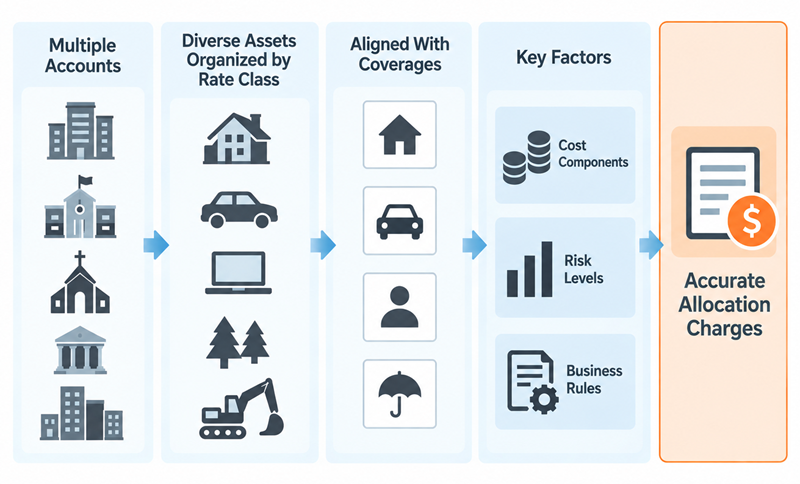
The overall allocation method runs by properly assigning rate classes to groups of assets, which together are aligned with specific coverage types. These coverages are linked to funds to direct insurance payment collections.
The Allocations module was created to take the guesswork out of determining the total cost of risk for a wide variety of assets that are often spread out across hundreds of accounts.
Coverage charges are determined by the complex relationships between assets and their rate classes, cost components, risk levels, and business rules:
Why is Quadra's Allocations module necessary for self-insured organizations?
Our clients must function as their own insurance companies and determine the right charges so all assets, including vehicles, property, and other exposures, receive adequate coverage. Charges should not be chosen arbitrarily or based on established practices that are no longer helpful or based on outdated asset information.
A logical allocation method should process ongoing asset changes throughout the fiscal year and account for different types of assets, resources, operations, and levels of risk across accounts.
Quadra's Allocations module is the leading solution that accounts for all these factors. Its methodology ensures that the resulting charges appropriately reflect asset portfolios and loss control priorities.
Transparency for teams
The Allocations module in our solution Quadra is a singular feature developed for self-insured organizations. Together with asset management and accounts receivable tools, it dramatically simplifies the valuation, billing, and collections process that comprise an insurance program.
We developed the new Inspectors suite so financial directors and risk managers can review details on how specific charges were generated. Additionally, they can share this information with their internal teams and auditors. They can show that charges are justified and grounded in solid allocation logic.
Having this information clearly organized can make audits more efficient by giving auditors the supporting detail they need to understand how results were reached, without requiring staff to reconstruct calculations or gather information from multiple sources. Transparency also gives teams a shared understanding of the factors behind their insurance charges, helping build confidence in the process and trust in the information they use to make financial and risk management decisions.
View the Allocation Inspectors
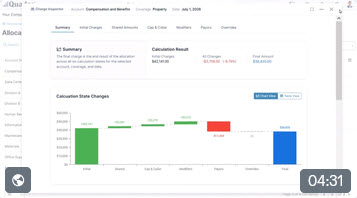
This video provides an introduction on the allocation Inspectors: What they are, what data they display, and how to access them:
Whether investigating a single charge, understanding an unexpected asset change, or reconciling an invoice, the Inspectors bring transparency to the overall allocation process.
We hope these developments support your ongoing efforts in insurance management, asset protection, and financial leadership. Stay tuned for more Quadra updates!