Options for Number Sequencing

Source: Adobe Stock
As spring arrives, we’re pleased to share several enhancements included in Quadra® v11.3.4. These updates introduce expanded automated number sequence capabilities for invoices and project numbers, helping to streamline workflows and improve consistency for the billing process. We’ve also added a simplified shared amount display for allocations and an improved leases contact format for greater clarity.
Expanded number sequence generation options
In Quadra, number sequences are used to help standardize identification numbers on invoices and projects. By establishing sequence rules, users can create customized formats for identification numbers that are automatically generated for projects or invoices.
With this release, Quadra's sequence generation logic was enhanced so invoice numbers can accommodate variable text tags such as {account number}, {fiscal year}, {year}, {month}. In addition to specifying the number of digits and the next number in the sequence, these variable text tags offer greater flexibility for identifying invoices.
Number sequences for invoices are managed in the Accounting tab when creating an allocation. The settings are found under More Settings. Selecting Client Sequence allows you to create a custom rule:
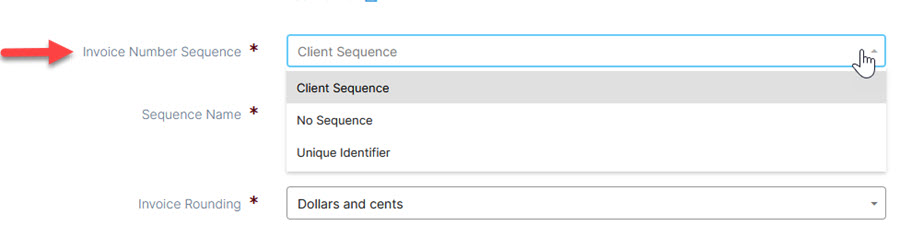
Under Manage Sequences, create rules that will automatically number the invoices based on your selected number:
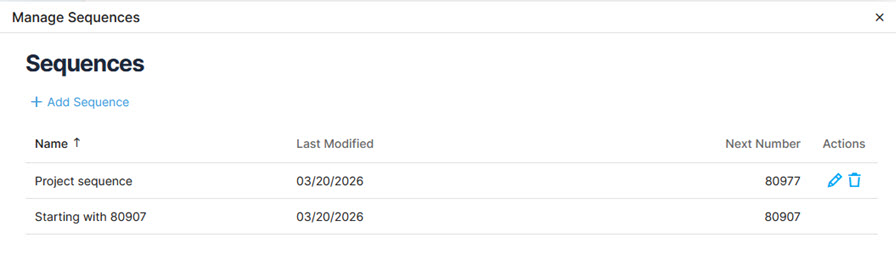
Example of a number sequence format:
If your sequence rule starts with '123' and the sequence total specified is 6, zeros will be added to produce a number with 6 characters.
For example, YCS-{sequence:6} will yield 'YCS-000123' as the invoice number.
Examples of using number sequence formats in conjunction with variable text:
YC-{Sequence:6}-{Fiscal year}
YC-{Sequence:7}-{Month}, {Year}
{Account Name}-{Sequence:7}-{Month}, {Year}
Simplified shared amount display
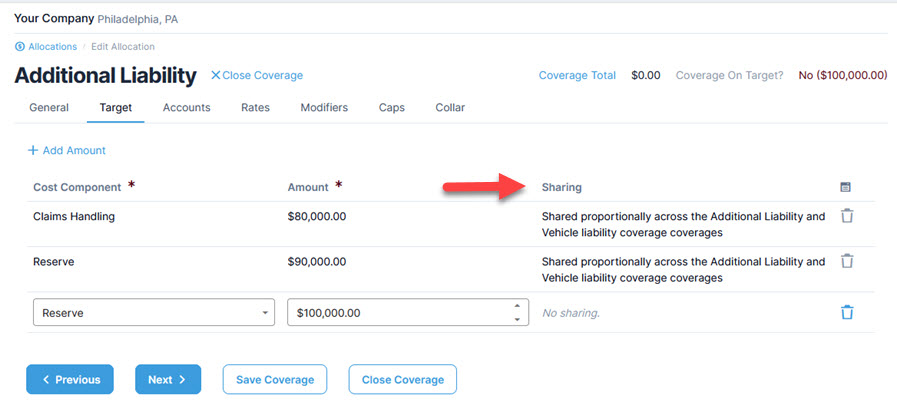
Additionally, we have simplified the shared amount display on the allocation coverage target tab. This update supports the overall cost component input process.
Shared amounts details are displayed in the Targets tab when creating a new allocation:
Improved contact format for the Leases module
With v11.3.4, the Leases module grid now displays the company along with individual-type contacts for additional clarity.
We hope your spring is off to a great start and be sure to stay tuned for more updates!