Using Number Sequences for Invoices
Number sequences help standardize identification numbers. They can be used for invoices and projects in Quadra. By establishing sequence rules, you can create customized formats for identification numbers that are automatically generated.
Note that number sequences can accommodate variable text tags including {Account Number}, {Fiscal Year}, {Year}, and {Month} along with the existing {Sequence} tag.
Create a Number Sequence for Invoices
Managing Sequences for Invoices
Example of an Invoice Number Format
Create a Number Sequence for Invoices
Number sequences for invoices are managed in the Accounting tab when creating an allocation. These settings are listed under More Settings.
- Open the Accounting tab in the Allocations module.
- Click More Settings.
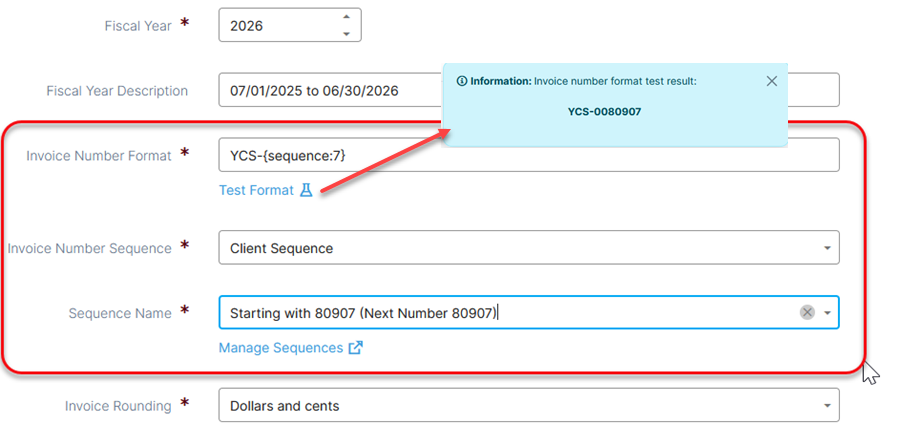
- For the Invoice Number Format include a series of numbers or letters with the sequence. Enclose the word 'sequence' in curly brackets with a colon that is followed by a number between 1 and 9. The number indicates the total number of characters produced. See the example for an invoice number.
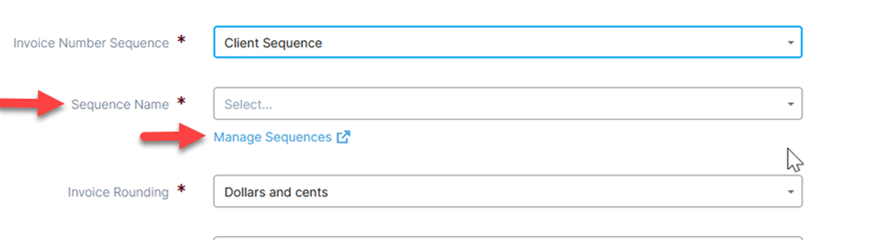
- Under Invoice Number Sequence select Client Sequence to use your own sequence rule. If you select Unique Identifier Quadra will generate a number based on the number of characters defined in the above step.

- Under Sequence Name select a sequence rule that you have created which will automatically number the invoices based on your selected number. These rules are managed under Manage Sequences (See instructions in the next section below).
- Click Test Format to see an example of how the number sequence will appear.
Managing Sequences for Invoices
- Open the Accounting tab in the Allocations module.
- Click More Settings.
- Under Sequence Name click Manage Sequences.
- Click Add Sequence.
- Create a Name for the sequence. Then specify the Next Number in the sequence. This is what future invoices will be numbered from.
- Click the Save icon.

Example of an Invoice Number Format
If your sequence rule starts with '123' and the sequence total specified is 6, zeros will be added to produce a number with 6 characters.
Example: YCS-{sequence:6} will yield 'YCS-000123' as the invoice number.
Read more about number sequences.